
Design System
JARVIS 2.0
Behind Jarvis 2.0
Unlike consumer-apps, an internal tool is prompt to has information overload, since there are various users with different roles. They have different motivation and task that they meant to complete. Therefore in each page, there are a lot of flow that have to be tailored intuitively.
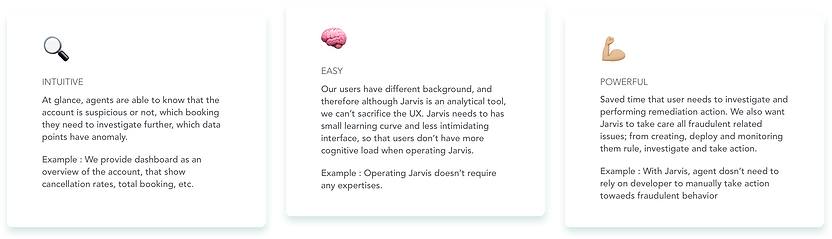
Although Jarvis is an intelligent machine, we wanted to make it as easy as possible, we wanted to make it humane. We took these principles when designing Jarvis, to keep it intuitive, to enable users complete their task at glance, to keep it less intimidating, yet powerful.
Methods
Understand users and prioritize their needs
Contextual Inquiry
Observe how people use JARVIS
Prevent us from making risky assumption that leads to design mis-steps
User Interview
Ask direct questions which contextual inquiry doesn't answer
To capture user wants and needs.
Grouping user wants and needs into similar themes
Affinity Diagram
To prioritise user needs and urgency
Build design system
Foundational
Collect components
Make Pattern Library
1.1. Understand users and their perspective
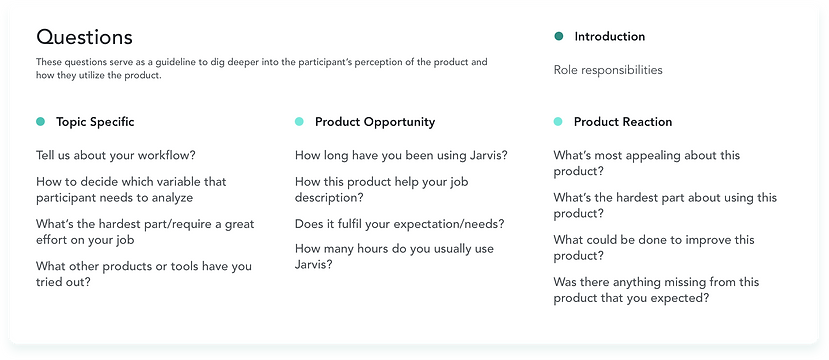
This research aims to understand how user perceives and use JARVIS to investigate Fraud Scenarios and mitigate fraud risk. It seeks to answer the following questions :
-
What are the most critical feature(s) to build next
-
How user interact with the product and what’s their intention/motivation
-
How the product enable them to perform their role/responsibility
-
What are the users’ pain-points
Participants
n = 10
Appeals, Ops, and Fraud Analyst - the main user of Jarvis
1.2. Insights
This section provides recommended changes and justification driven by participant’s expectations and needs, recorded through above user interview.
The following recommendations seeks to improve the overall ease of use and address the areas where participants experienced problems.

1.3. Affinity Diagram
Based on insights above, we grouped several recommendation that has one outcome ; which is to show Connected Accounts. This is big project that will be explain in other document. As for recommendation that will be included in Jarvis 2.0 are :
1. Account Dashboard
2. Eliminate unnecessary step
3. Guideline
4. Booking history

2. Who is the users
Analyst
Workflow
-
See the trend on Tableau (e.g. effect of incentive on regional, a driver who’s always get incentives)
-
Query to get the list of users (e.g. has high velocity)
-
Analyze why the anomalies happen, if it’s fraudulent, identify the intention
-
Deep dive with individual information or taking action using Jarvis
Appeals Team
Workflow
-
Searching ticket on Zendesk (e.g. suspended driver)
-
Check metabase card (e.g. 10408) with order no, booking time, driver/cust/apps ID
-
Confirm the ID on Jarvis and analyze fraudulent or not
-
If yes, refer to Kemitraan team, the driver might terminated
Driver Care Unit (Ops)
Workflow
-
Identify problem of Zendesk ticket
-
e.g. if customer suspended -> see the code -> can the agent unsuspend immediately?
-
If yes, submit ticket as ‘solved’. Otherwise, submit ticket as ‘On Hold’ and submit to Appeals team.
-
Jarvis was used for checking booking history, driver data, take action
In summary, these are their goals
-
Analysts need to check anomalies trend/pattern, sanity check, take action
-
Appeals need to check false positive, labelled and un-suspend
-
DCU/CCU needs to check individual status, track records, take action
3. Design Guideline
4. Behind Landing Page
Landing Page Architecture

If you see the diagram above, ‘Search’ also contain information as big as the other micro-services; Real-time Rule Maker, Sanction Service and Blacklist. In fact, the other micro-services have restricted access which is for internal fraud only.
That leave ‘Search’ as one of the main objectives when users access Jarvis.

Objective:
We want user to intuitively understand what they can do in Jarvis, which is searching for customer or driver profile.
Why version B?
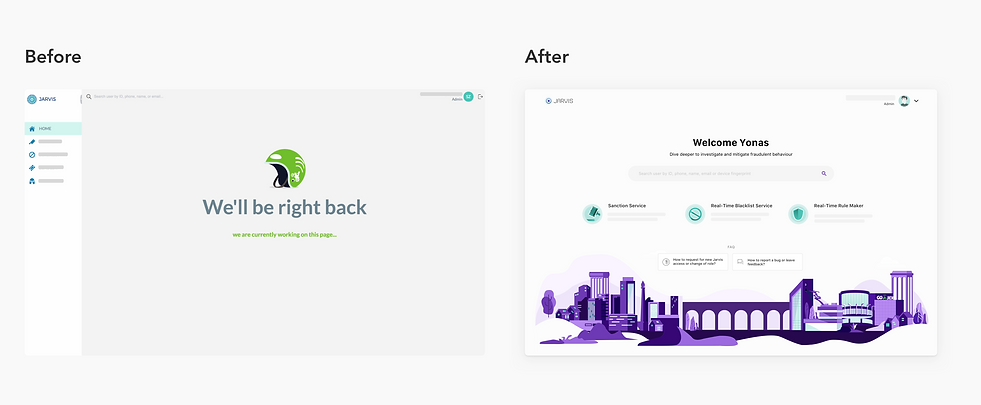
In Version B, search has a higher hierarchy than the other micro-services. Like Google, the simplicity landing page also hide the complexity of its result.
For now, we don’t have anything on landing page. Therefore, emphasizing search field will filling up the excessive white space. Later, we envision landing page has another function to monitor ‘what happening in the current day’ and provide a lead to the suspicious users (see Version C).
By changing the position of the micro-services navigation, we treat the micro-services as different product.

5. Components

5. Measuring the User Satisfaction
After Jarvis 2.0 deployed, we sent out a survey to measure success rate from our re-design.
Who are these user survey questions for?
Analyst (access all questions)
Appeals (access all questions)
Ops (DCU/CCU) (access 1st & 3rd page)
On the time we sent this survey, we have 933 unique users, this questionnaire was sent randomly to 390 people : 303 DCU, 31 CCU 1st layer, 42 CCU, 9 Appeals, 5 Analysts. We get 76 responds (19.5%).
What are we actually asking?
- Measuring the site usability and user satisfaction
- Pinpoint user pain point and how to improve
- User's role and what's their objective in using jarvis
- Frequency of usage
- What they like the least, and the most

Brief Summary
91% of our respondent using Jarvis everyday
Total usability score is 7.5 from 10. User has difficulty on spot anomalies and still need different tools mainly because of the incomplete data points, 14% user ask for device ID to see connected accounts and 8% ask for driver suspension history. Action has the highest usability score (8.8 and 8), follow by our search tools. They also become one of the most like feature in Jarvis. For search, the improvement can be made by shortening loading time and provide smart search (e.g. elastic search and autofill).
Jarvis has a rather low rates for reliability, 5.9 out of 10, 28% user felt downtime issue everyday, and 28% other felt it once a week.
For the new user, 21% of them confuse on how to take action (the SOP and the permission to suspend/unsuspend), 21% others confuse on how to search driver violation and 14% have difficulty on how to login.
Relatively good NPS, with 17 out of 49 people as promoter, and 14.9 NPS score
Great CSAT (Satisfaction score) with 81.8 out of 100